If you’ve ever tried feeding a PDF into an LLM and wondered why the output was garbage — the problem wasn’t your model. It was your parser.
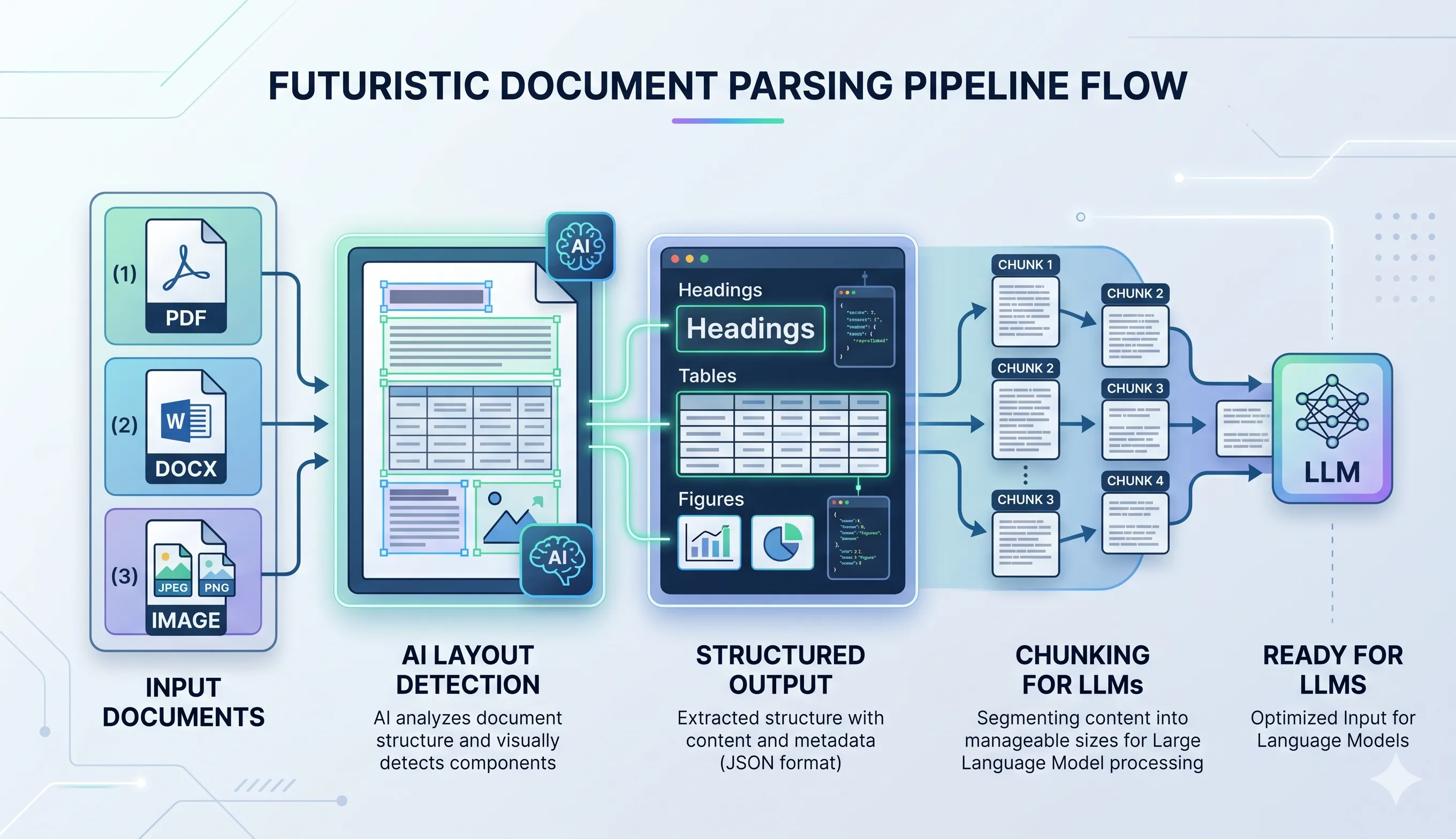
Docling is an open-source document AI pipeline by IBM Research that goes far beyond text extraction. Unlike traditional tools like pypdf or pdfplumber, Docling uses deep learning to understand document structure — reconstructing tables, fixing reading order, and producing clean, LLM-ready output. Whether you’re building a RAG system, processing financial reports, or ingesting research papers, Docling is the document intelligence layer your pipeline is missing.
It doesn’t just extract content — it reconstructs the meaningful layout of a document.
generated by nano banana 🍌
Why Docling Beats Traditional Parsers
Let’s be honest — traditional libraries were never built for AI workflows.
| Feature | Traditional Parsers | Docling |
|---|---|---|
| Text Extraction | ✅ | ✅ |
| Layout Understanding | ❌ | ✅ |
| Table Reconstruction | ❌ (messy text) | ✅ (structured grid) |
| Multi-format Support | Limited | Extensive |
| Reading Order | Broken in columns | Correct |
| Chunking for LLMs | Manual | Built-in |
| Metadata Awareness | ❌ | ✅ |
The Real Problem with Traditional Tools
Traditional tools:
- Extract text based on positions, not meaning
- Break tables into unreadable blobs
- Completely mess up multi-column layouts
- Lose context like headings, sections, and hierarchy
Result: Garbage input → Poor LLM output
Docling’s Edge
Docling flips the game:
- Uses deep learning models (not heuristics)
- Understands document structure like a human
- Outputs clean, structured, LLM-ready data
This is not parsing — this is document intelligence.
Multi-Format Support (One Pipeline to Rule Them All)
Docling isn’t just for PDFs.
It seamlessly handles:
- Word (.docx)
- PowerPoint (.pptx)
- Excel (.xlsx)
- HTML / Markdown
- Images (PNG, JPEG, TIFF)
- AsciiDoc
You can run a single pipeline across mixed document types — something traditional tools simply can’t do.
The Parsing Phase — Where Docling Truly Shines
Layout Understanding (DocLayNet)
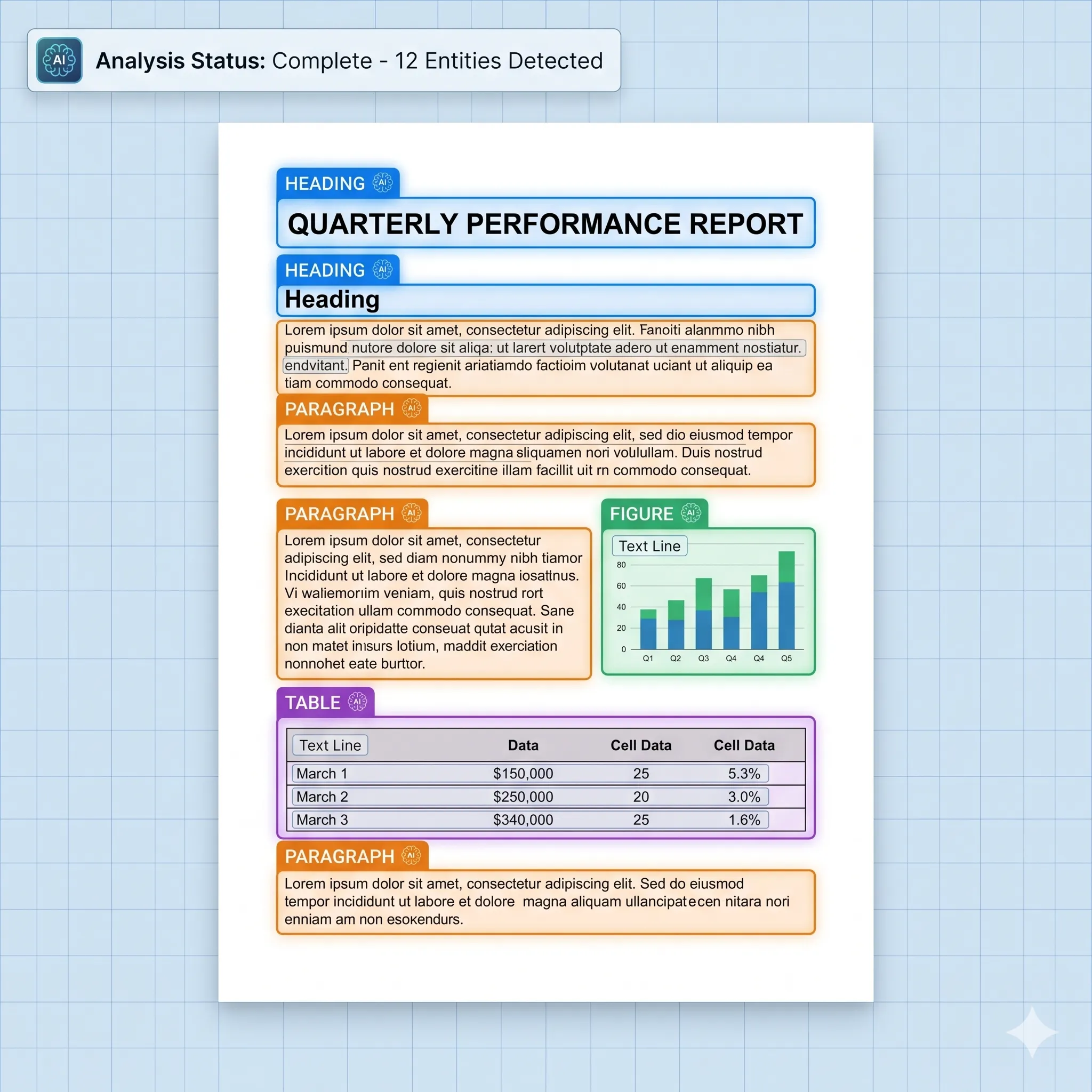
Docling uses DocLayNet, a trained model that identifies:
- Headings
- Paragraphs
- Tables
- Figures
- Captions
- Footnotes
- Lists
- Code blocks
It doesn’t just see text — it understands what that text is.
generated by nano banana 🍌
Table Parsing (TableFormer)
Traditional tools butcher tables.
Docling uses TableFormer to:
- Reconstruct full table grids
- Handle merged cells
- Understand multi-line headers
- Preserve row/column relationships
Output = Clean, structured data (not scrambled text)
Figure & Chart Detection
- Extracts figures as images
- Links them with captions
- Maintains document context
⚠️ Note: It does not interpret chart data — only isolates it cleanly.
🔍 OCR (But Done Right)
For scanned documents:
- Uses EasyOCR / Tesseract
- Maintains layout-aware reading order
No more left-to-right OCR chaos.
Reading Order Recovery
This is a silent killer in PDFs.
Docling:
- Fixes multi-column reading
- Reconstructs logical flow
- Makes documents actually readable for LLMs
Chunking — Built for RAG (This is Gold)
If you’re building RAG systems, this is where Docling becomes insane value.
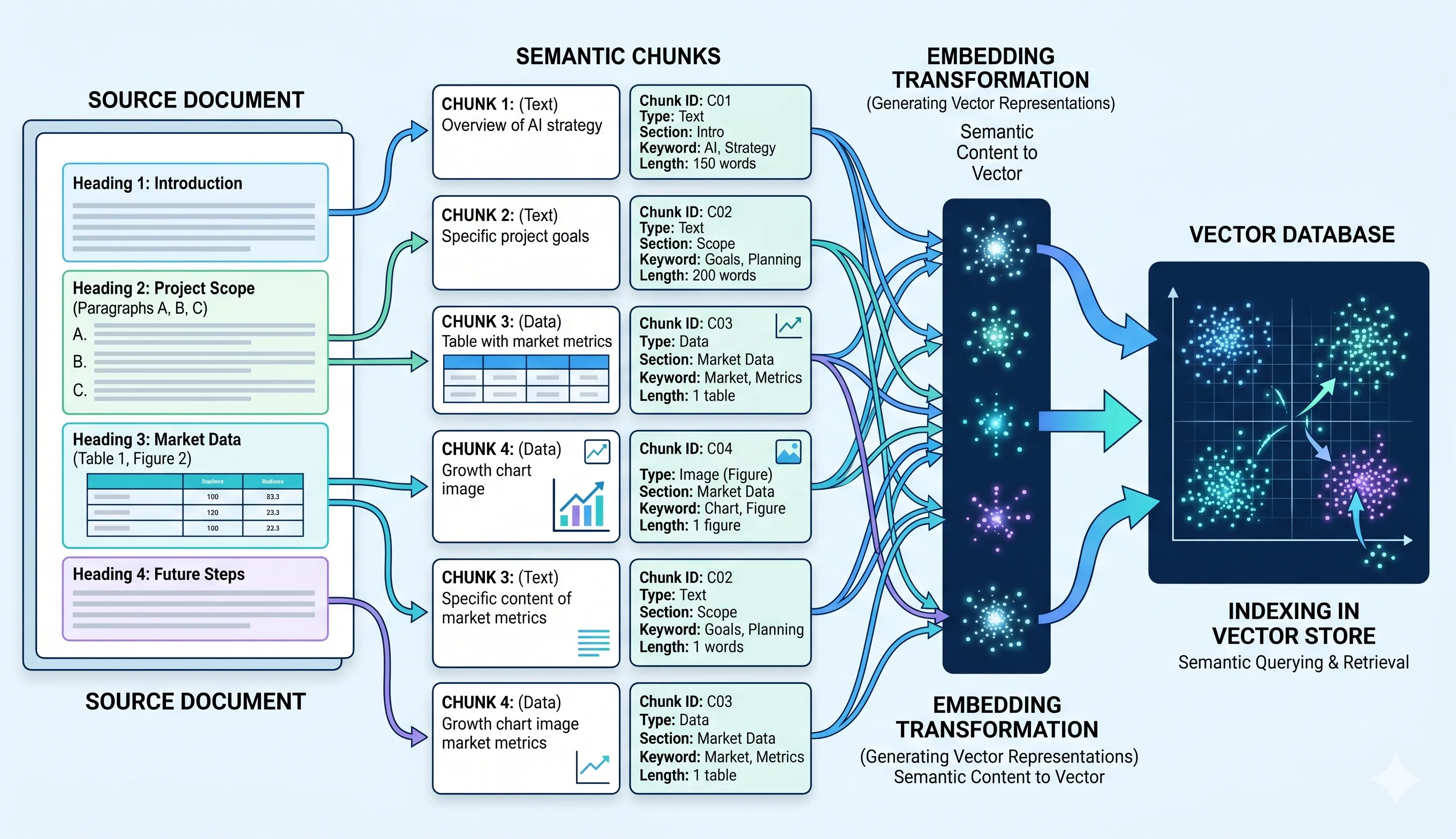
Hierarchical Chunking
- Respects structure (heading → section → paragraph)
- No random splits mid-sentence
Hybrid Chunking
- Combines:
- Semantic structure
- Token limits
Perfect chunks for LLM context windows
Context Preservation
Each chunk carries:
- Page number
- Bounding box
- Section hierarchy
Retrieval becomes accurate + explainable
Tables & Figures Stay Intact
- Tables are never split
- Figures remain atomic
No more broken context in retrieval
generated by nano banana 🍌
DoclingDocument — The Secret Sauce
Instead of raw text, Docling outputs a:
DoclingDocument
A structured representation of:
- Entire document hierarchy
- Layout elements
- Metadata
You can export it as:
- Markdown
- JSON
- HTML
This makes the pipeline fully composable
Plug-and-Play with LLM Ecosystems
Docling integrates with:
- LlamaIndex
- LangChain
- Hugging Face datasets
Drop it straight into your RAG pipeline as the ingestion layer.
⚠️ What Docling Isn’t Perfect At
Let’s keep it real:
- ❌ No chart-to-data interpretation
- 🐢 Slow for very large documents (200+ pages)
- ⚖️ Overkill for simple text PDFs
When Should You Use Docling?
Use Docling when working with:
- 📄 Research papers
- 📊 Financial reports
- 📘 Technical documentation
- 📜 Contracts
Basically — anything with structure
💡 When NOT to Use It
Skip Docling if:
- You just need plain text extraction
- Your documents are extremely simple
In those cases, lighter tools are faster.
Bonus: Notebook for Hands-On Usage
A full notebook is attached where you can explore Docling in action and integrate it efficiently into your pipeline.
Final Thoughts
Docling isn’t just another parser — it’s a foundation layer for Document AI systems.
If traditional tools are:
“Extract text and hope for the best”
Docling is:
“Understand the document, preserve its meaning, and make it LLM-ready”
🧠 My Take
As LLM applications grow, input quality matters more than model size.
Docling solves the real bottleneck: 👉 Turning messy documents into structured, meaningful data
And that’s exactly why it stands out.